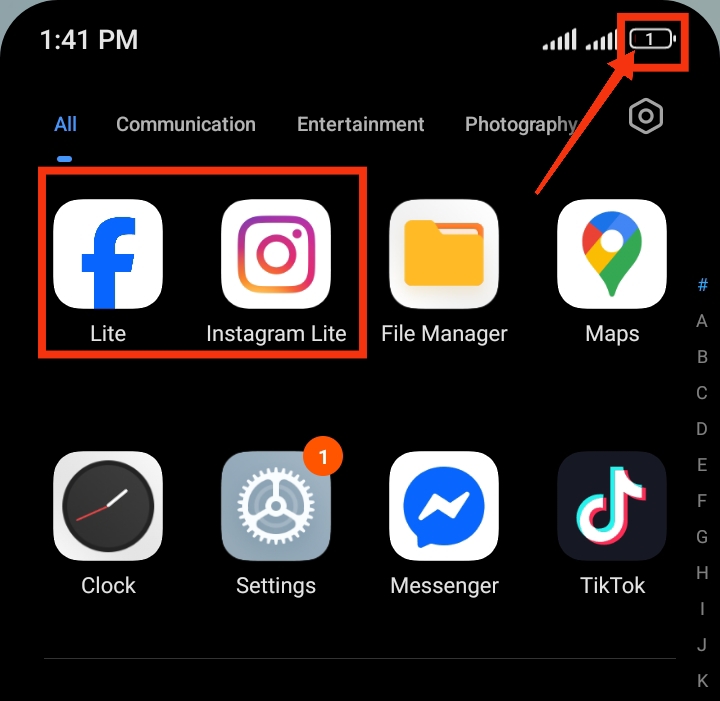
Facebook and Instagram are two of the most popular social media apps used daily by millions of people. While they are useful for staying connected and sharing content, many users notice that their phone battery drops faster when these apps are installed. This usually happens because both apps continue running in the background, refreshing content, sending notifications, and syncing data. In this guide, you will learn why this happens and practical ways to reduce battery usage on both Facebook and Instagram without affecting your normal usage.
Also read: how do i stop tiktok from draining my battery in the background
Why Facebook and Instagram Consume So Much Battery
There are several reasons why these apps drain battery power more than expected:
1. Background Activity: Facebook and Instagram keep working even when you are not using them. They constantly check for new posts, messages, and updates, which keeps your phone active in the background and uses power.
2. Automatic Media Loading: Both apps automaticall y load images, videos, and reels. This continuous loading process uses internet data and processing power, which contributes to battery drain.
3. Frequent Notifications: Notifications from likes, comments, messages, and suggested content wake your phone repeatedly. Each alert activates the screen and consumes battery power.
4. High Screen Usage: Scrolling through videos, reels, and high-quality images increases screen time, which is one of the biggest causes of battery consumption.
5. Location Services: When location access is enabled, both apps may track your location for tagging posts or showing nearby content, which increases battery usage.
6. Outdated App Version: Older versions of Facebook or Instagram may contain bugs or inefficient processes that cause higher battery consumption than updated versions.
Also read: How do I stop WhatsApp from draining my battery in the background?
How to Save Battery When Using Facebook and Instagram
Reducing battery drain from Facebook and Instagram requires adjusting a few settings. These changes will not stop the apps from working, but they will make them more efficient and less demanding on your phone battery.
1. Manage App Notifications
Notifications are one of the major reasons your battery drains faster because they constantly wake your phone screen, trigger vibrations or sounds, and force the system to check for updates repeatedly.
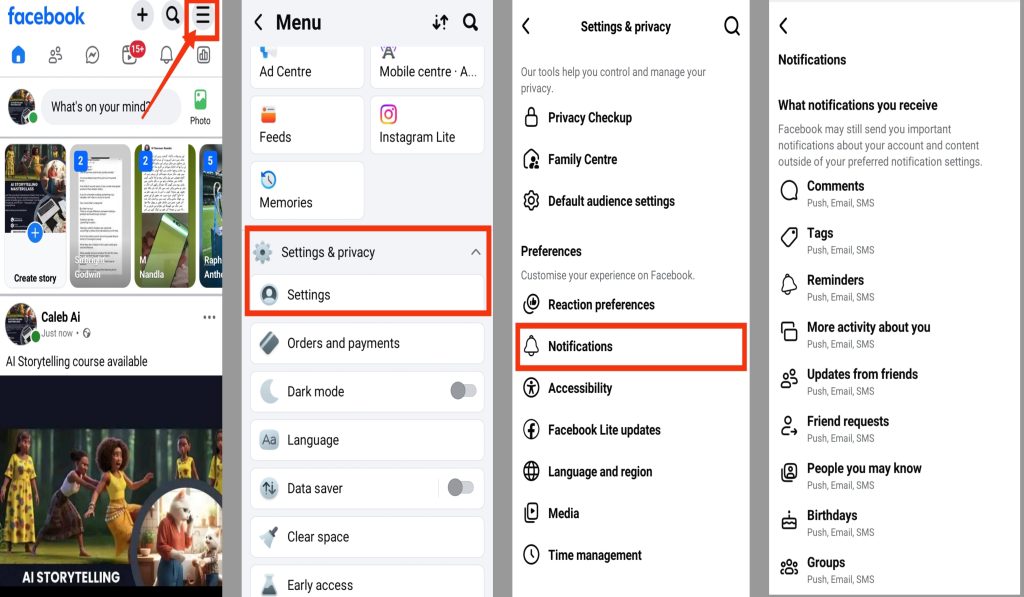
For Facebook:
- Open the Facebook app
- Tap the menu icon
- Go to Settings & Privacy
- Select Settings
- Tap Notifications
- Turn off or reduce notifications you don’t really need (such as suggestions, birthday reminders, and group updates)
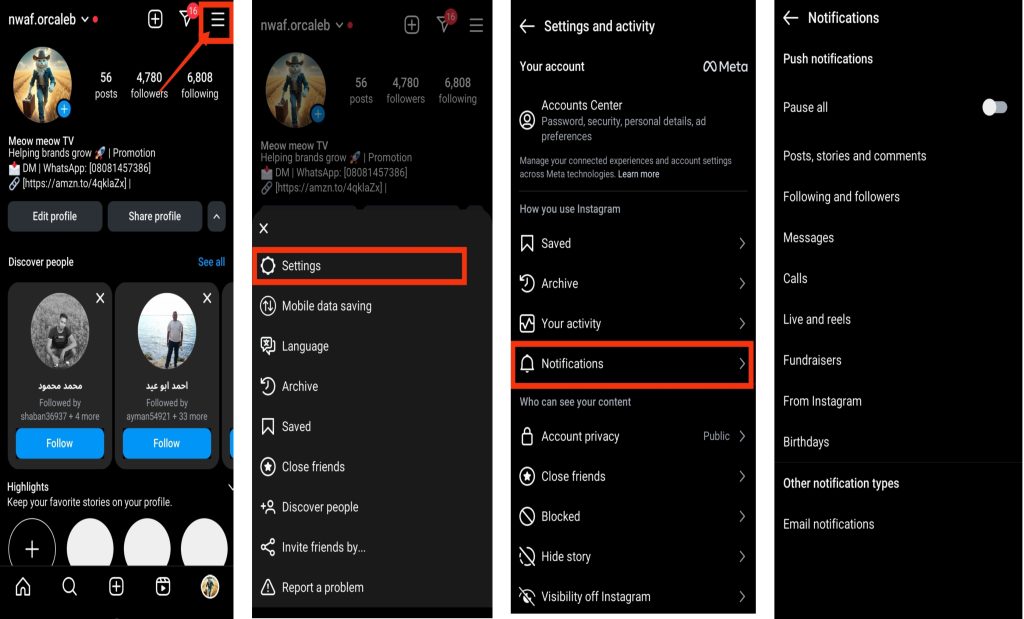
For Instagram:
- Open Instagram
- Go to your profile
- Tap the menu icon (three lines)
- Select Notifications
- Adjust or pause alerts like likes, follows, and recommendations
By reducing unnecessary notifications, your phone stays idle longer and does not wake up constantly, which helps improve battery life significantly.
2. Restrict Background Activity
Both Facebook and Instagram continue to run in the background even when you are not using them. This background activity helps you receive messages and updates instantly, but it also consumes battery power over time.
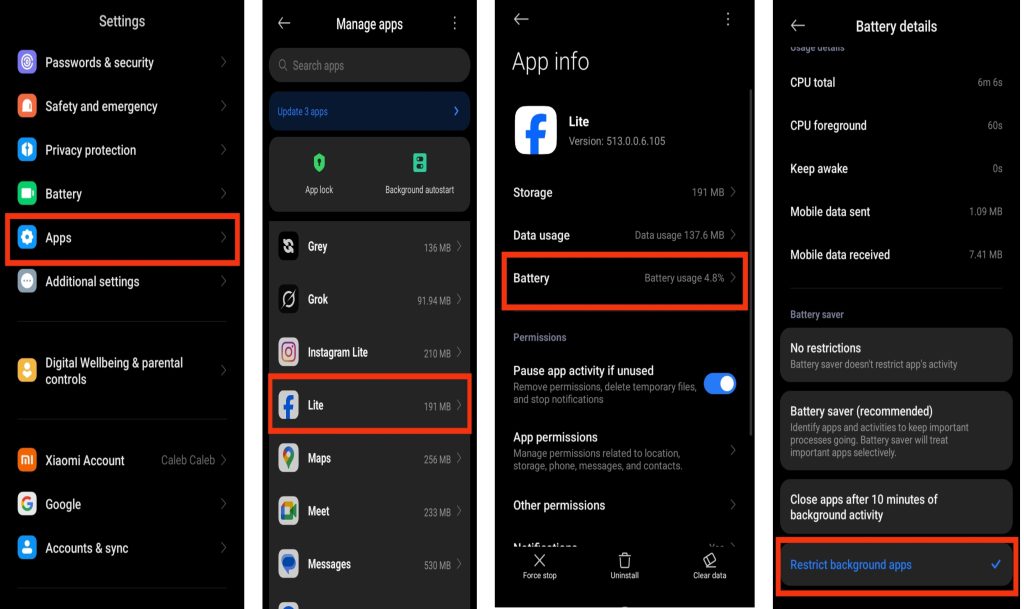
On Facebook:
- Go to Settings
- Tap Apps
- Select Facebook or Instagram
- Tap Battery
- Choose Restricted or limit background activity
On Instagram:
- Go to Settings
- Tap Apps
- Select Instagram
- Tap Battery
- Choose Restricted or limit background activity
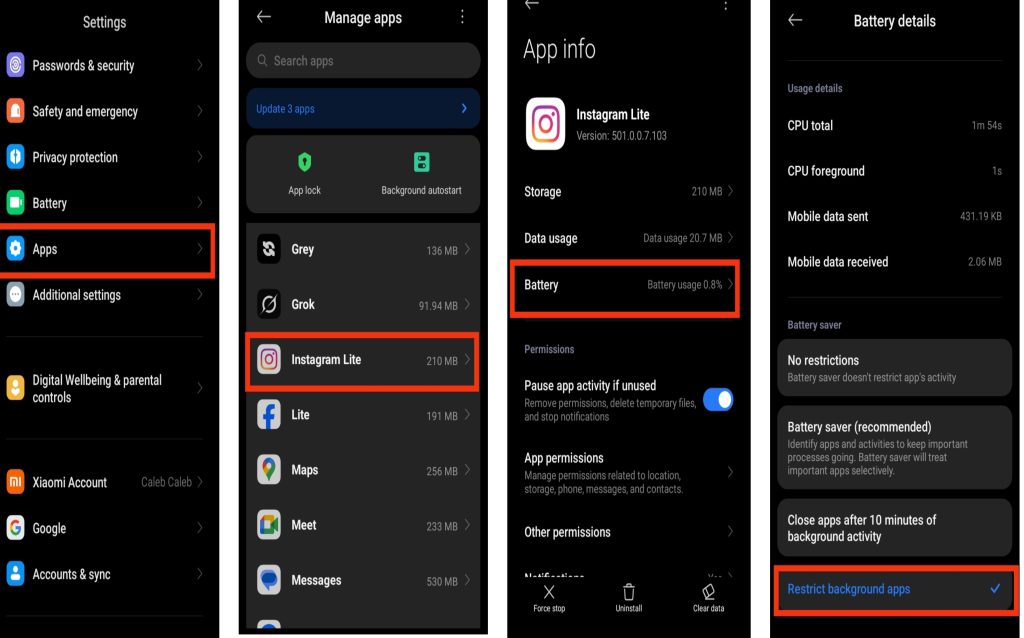
This step reduces hidden processes and prevents the apps from constantly refreshing when you are not actively using them.
3. Reduce Video Autoplay
Videos, reels, and stories on both Facebook and Instagram often play automatically. While this makes browsing smoother, it also increases battery usage because your phone is constantly loading and processing video content.
- Open Facebook or Instagram settings
- Go to Media or Data Usage
- Turn off autoplay or set it to Wi-Fi only
- Enable “Use Less Data” if available
This reduces unnecessary video loading and helps your battery last longer, especially when you are using mobile data.
4. Enable Dark Mode
Dark Mode helps reduce power consumption by lowering the amount of bright light your screen produces, especially on OLED and AMOLED displays where dark pixels use less energy.
Facebook:
- Open the app
- Go to Settings & Privacy
- Tap Display & Accessibility
- Turn on Dark Mode
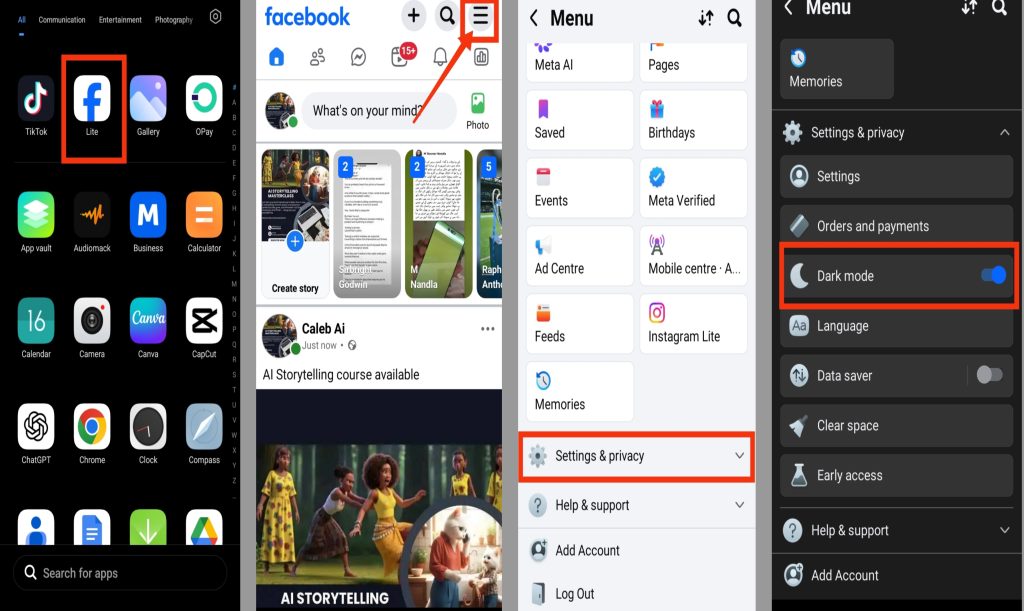
Instagram:
- Turn on system-wide dark mode from your phone settings
- Instagram will automatically switch to dark mode
This not only helps save battery but also makes the apps more comfortable to use at night or in low-light environments.
5. Limit Location Access
Location services can silently drain battery because your phone is constantly tracking and updating your position in the background.
On Facebook:
- Open Phone Settings
- Go to Privacy or Location Services
- Select Facebook
- Change permission to While Using the App or Never
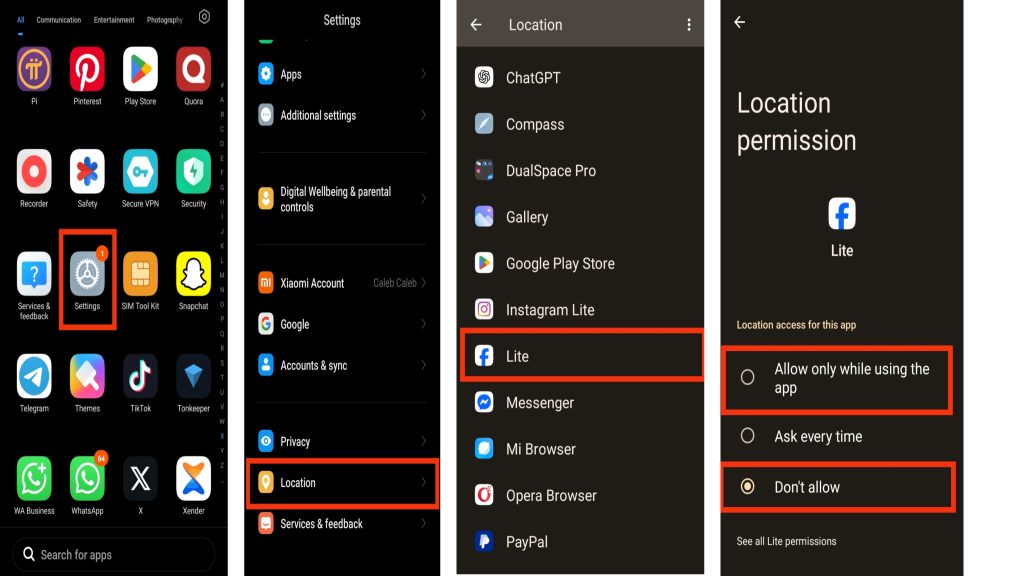
On Instagram:
- Open Phone Settings
- Go to Privacy or Location Services
- Select Instagram
- Change permission to While Using the App or Never
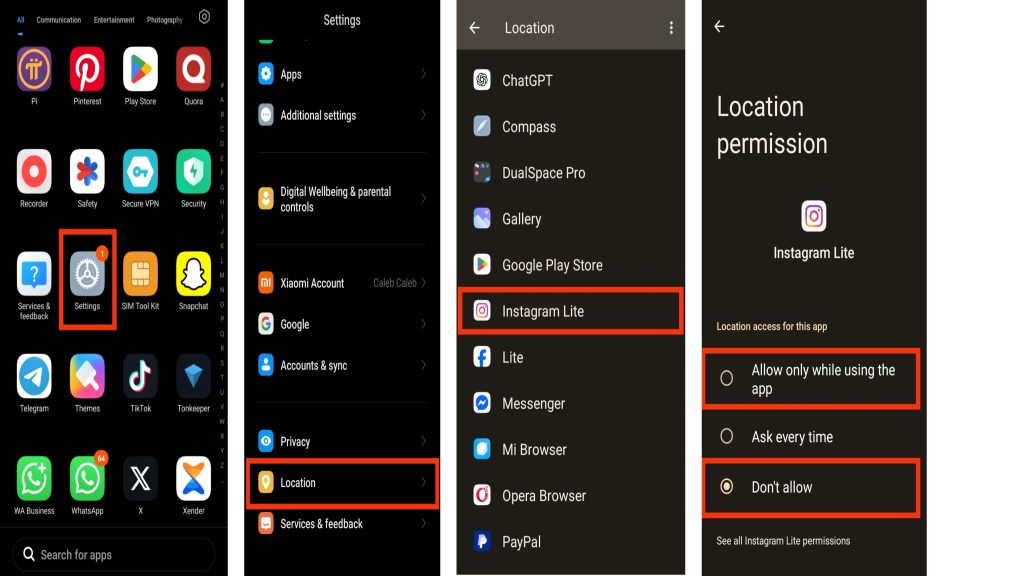
This stops continuous GPS tracking and reduces background battery usage significantly.
6. Update the Apps Regularly
Keeping Facebook and Instagram updated ensures you are using the most optimized versions of the apps. Updates often include performance improvements, bug fixes, and better battery efficiency.
- Open Google Play Store or App Store
- Search for Facebook and Instagram
- Tap Update if available
Regular updates help prevent unnecessary battery drain caused by outdated or inefficient app versions.
Also read: why is my app store not working
Extra Tips to Reduce Battery Usage
Here are additional habits that can help improve battery life:
- Avoid leaving Facebook or Instagram open in multiple tabs or devices
- Reduce time spent watching reels or videos continuously
- Clear app cache occasionally to improve performance
- Use lighter browsing through mobile web versions when possible
- Restart your phone occasionally to refresh system performance
Also read: How to Stop Snapchat From Draining Your Phone Battery in the Background
Conclusion
Facebook and Instagram are great apps for staying connected, but their background activities can drain your battery faster than expected. By reducing unnecessary notifications, limiting background activity, disabling video autoplay, enabling Dark Mode, restricting location access, and keeping the apps updated, you can significantly improve your phone’s battery life. Applying these simple adjustments allows you to enjoy both apps while keeping your device running longer throughout the day.
Frequently Asked Questions (FAQs)
1. Does clearing Facebook and Instagram cache help improve battery life?
Yes, clearing the cache can help if the apps have accumulated a large amount of temporary data. Excessive cached files may cause the apps to work harder in the background, affecting performance and battery usage. Clearing the cache occasionally can keep the apps running more efficiently.
2. Why do Facebook and Instagram use more battery on older phones?
Older smartphones usually have less powerful processors and smaller batteries compared to newer devices. As Facebook and Instagram continue to add new features, older phones may need to work harder to run them smoothly, leading to faster battery drain.
3. Can poor network signal increase battery usage while using social media apps?
Yes. When your phone struggles to maintain a stable internet connection, it uses additional power to search for and reconnect to mobile networks. This can cause Facebook and Instagram to consume more battery than usual.
4. Is it better to use Facebook and Instagram through a web browser instead of the apps?
For some users, accessing Facebook and Instagram through a mobile browser can reduce battery consumption because browsers generally use fewer background processes than dedicated social media apps. However, some app-specific features may not be available.
5. How can I tell if Facebook or Instagram is draining my battery more than other apps?
You can check your phone’s battery usage statistics in the Settings app. Most Android and iPhone devices show a breakdown of battery consumption by app, making it easy to identify whether Facebook or Instagram is using an unusually high amount of power.