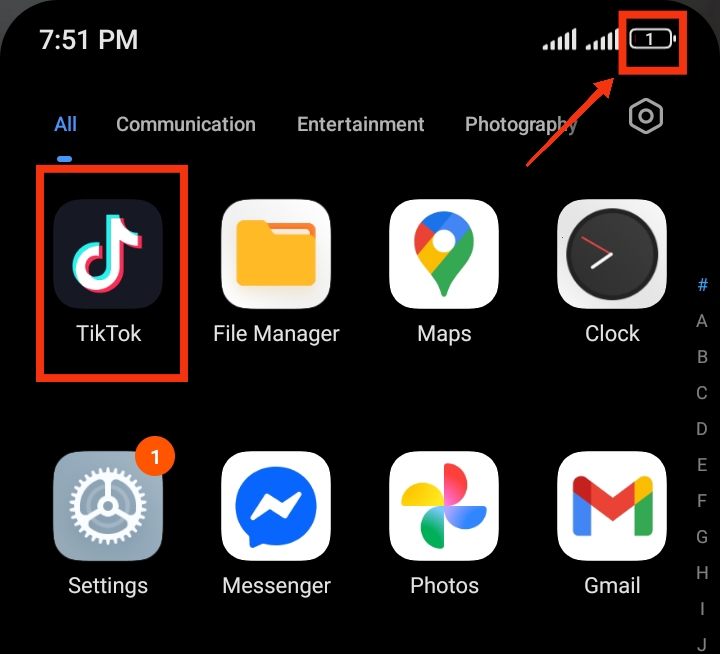
TikTok is one of the most popular social media apps, allowing users to watch videos, create content, and interact with others every day. Since the app constantly refreshes feeds, syncs data, and sends notifications in the background, it can sometimes use more battery than expected. If your phone battery drains quickly, TikTok could be part of the reason. Thankfully, there are simple ways to reduce its battery usage and improve your phone’s performance. In this guide, you’ll learn why TikTok drains battery and the best ways to stop it from using too much power in the background.
Why Does TikTok Consume So Much Battery
Here are some of the main reasons TikTok consumes a lot of battery:
1. Constant Background Activity: TikTok keeps working in the background even when you are not actively using it. It refreshes your feed, checks for new content, and updates notifications, which keeps your phone’s processor active and increases battery usage.
2. Continuous Video Streaming and Preloading: The app automatically loads and prepares videos before you even watch them. This preloading system makes scrolling smoother but also uses more data, processing power, and battery in the process.
3. High Screen Usage During Watching: TikTok is a video-based app, so users often spend long periods with their screen on. Bright display, long watch time, and continuous video playback all contribute to faster battery drain.
4. Heavy Notification Activity: Likes, comments, follows, and suggested content alerts frequently wake your phone. Each notification turns on your screen or vibration, which adds up to higher battery consumption throughout the day.
5. Background Data Synchronization: Even when the app is closed, TikTok may still sync data, update your account activity, and load content in the background. This ongoing internet usage increases power consumption.
6. App Optimization and System Load: TikTok is a resource-heavy app that requires strong CPU and memory performance. On some devices, especially low or mid-range phones, this extra load can cause faster battery drain compared to lighter apps.
7. Bright Screen and High Video Quality: Watching TikTok in high brightness or high-resolution video mode can increase battery usage. Since videos run continuously, your display and processor stay active for long periods, which consumes more energy.
8. Outdated App Version: Using an older version of TikTok may also cause battery drain. Outdated versions can contain bugs or inefficient processes that make the app use more power than necessary. Regular updates help fix these issues.
Also read: How do I stop WhatsApp from draining my battery in the background?
How to Save Battery When Using TikTok
Below are practical ways to improve your battery life while still using TikTok normally:
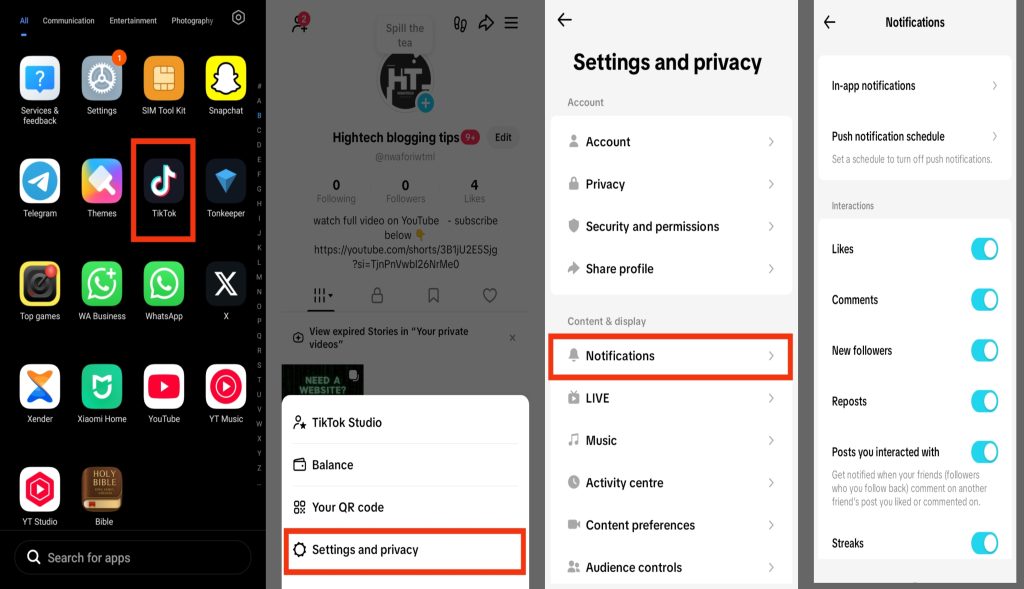
1. Manage Notifications
Notifications are one of the major causes of battery drain because they constantly wake your phone and activate the screen. If you receive many alerts daily, it increases background activity. Here are the steps to manage TikTok notifications:
- Open TikTok on your phone.
- Go to Settings and Privacy.
- Tap Notifications.
- Turn off or customize alerts.
- Disable likes, comments, and follow notifications if not needed.
2. Turn Off Background Activity
TikTok often runs in the background to refresh content and sync data. This keeps your phone active even when you are not using the app. Here are the steps to reduce background activity:
- Go to Settings on your phone.
- Tap Apps.
- Select TikTok.
- Tap Battery.
- Choose Restrict or Background limit.

3. Enable Data Saver Mode
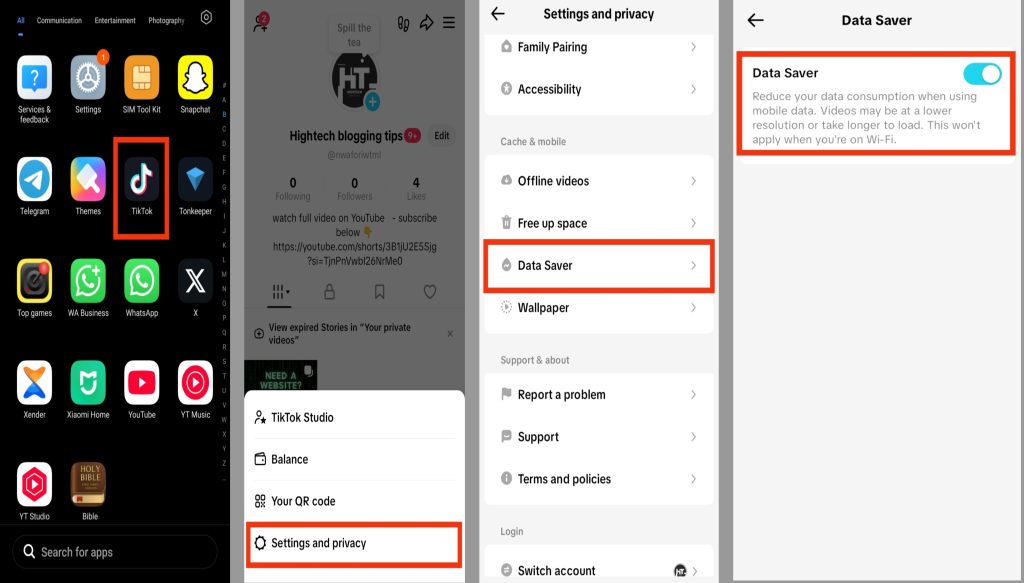
Data Saver Mode helps reduce the amount of battery TikTok uses by limiting video preloading and lowering background data activity. Since TikTok automatically loads videos while you scroll, enabling this feature can help your phone use less power and improve battery life during long usage. Here are the steps to enable Data Saver Mode:
- Open TikTok on your phone.
- Go to Settings and Privacy.
- Tap Data Saver.
- Turn it ON.
4. Disable Background App Refresh
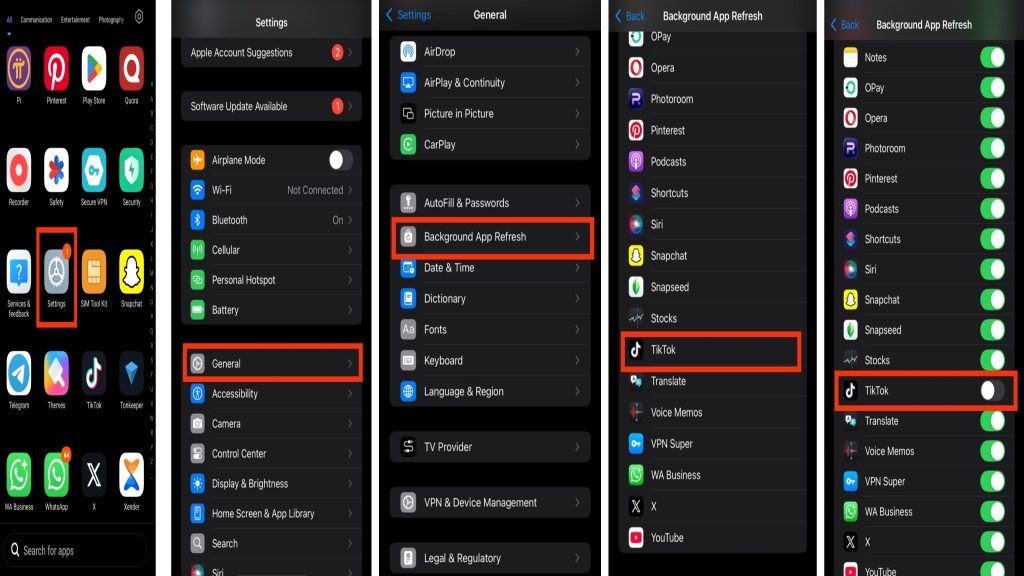
Background App Refresh allows TikTok to keep updating content and syncing data even when the app is not actively open on your phone. While this helps the app stay updated, it can also increase battery usage throughout the day. Disabling this feature can reduce unnecessary background activity and help your battery last longer. Here are the steps to turn it off:
- Go to Settings on your iPhone.
- Tap General.
- Select Background App Refresh.
- Find TikTok from the list.
- Turn it OFF.
5. Lower Screen Brightness While Using TikTok
Your screen is one of the biggest battery consumers when using TikTok. High brightness and long video watching increase power usage. Here are the steps:
- Open TikTok on your phone.
- Lower your phone brightness from quick settings.
- Avoid using maximum brightness for long periods.
6. Keep TikTok Updated
Using the latest version of TikTok can help reduce battery drain because updates often include bug fixes, better performance, and improved battery optimization. An outdated version may continue running unnecessary background processes that consume more power. Here are the steps to update TikTok:
- Open Google Play Store or Apple App Store.
- Search for TikTok.
- Tap Update if available.
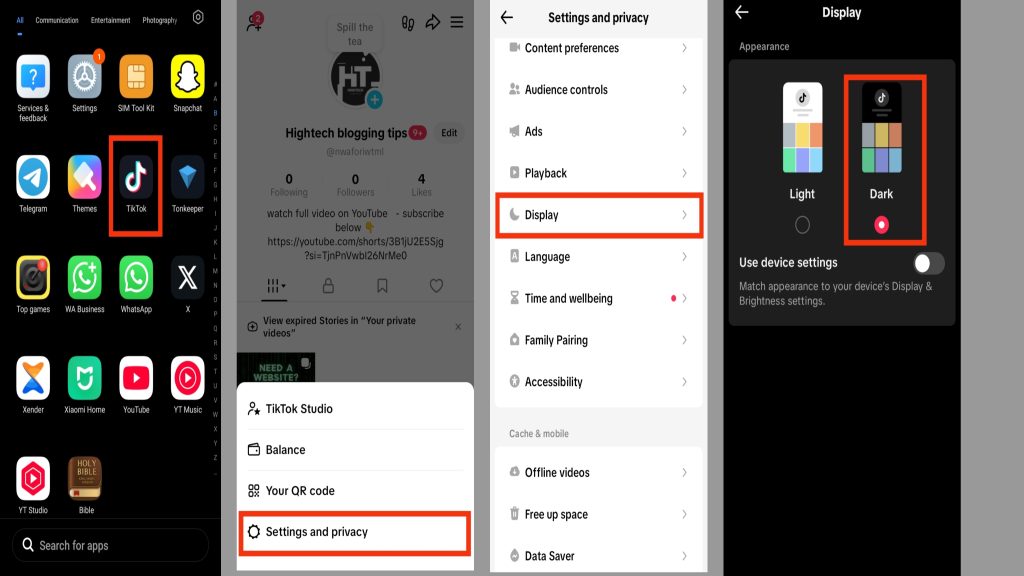
7. Use TikTok on Dark Mode
Dark Mode helps reduce battery usage, especially on phones with OLED or AMOLED screens. Since darker colors use less power, switching TikTok to dark mode can improve battery life during long usage.
- Open TikTok on your phone
- Go to Settings and Privacy
- Tap Display or Dark Mode (if available)
- Select Dark Mode
8. Clear TikTok Cache Regularly
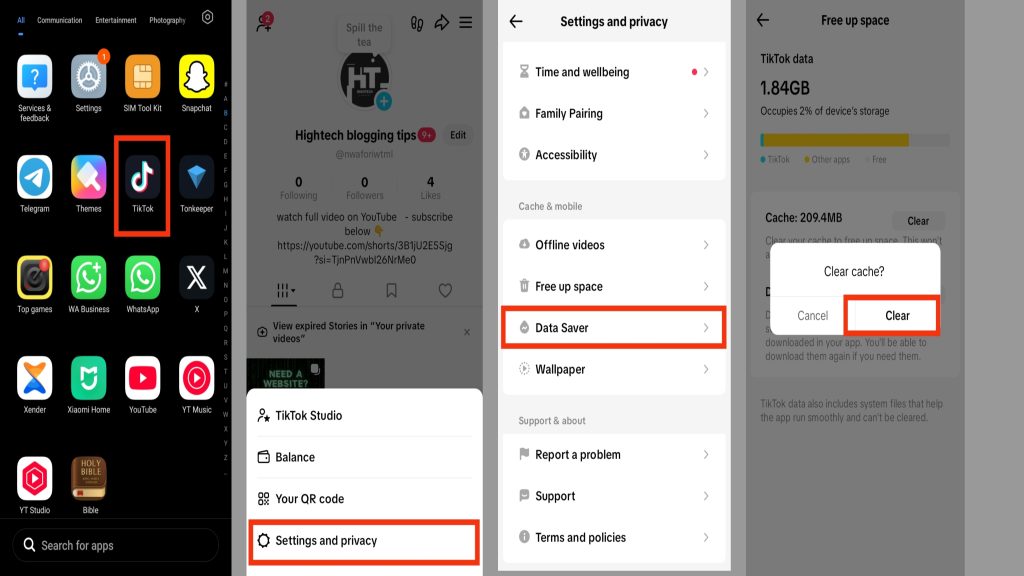
Over time, TikTok stores temporary files (cache) that can slow down your phone and increase background activity. Clearing cache helps the app run more efficiently and reduces unnecessary battery usage.
- Open TikTok
- Go to Settings and Privacy
- Tap Free up space
- Select Clear cache
9. Limit Video Quality Usage
High-quality video playback uses more power because your phone processes larger files and brighter visuals. Lowering video quality can help reduce battery drain during usage.
- Open TikTok Settings and Privacy
- Go to Data Saver
- Enable video compression options (if available)
- Avoid HD streaming on mobile data
10. Close Other Apps While Using TikTok
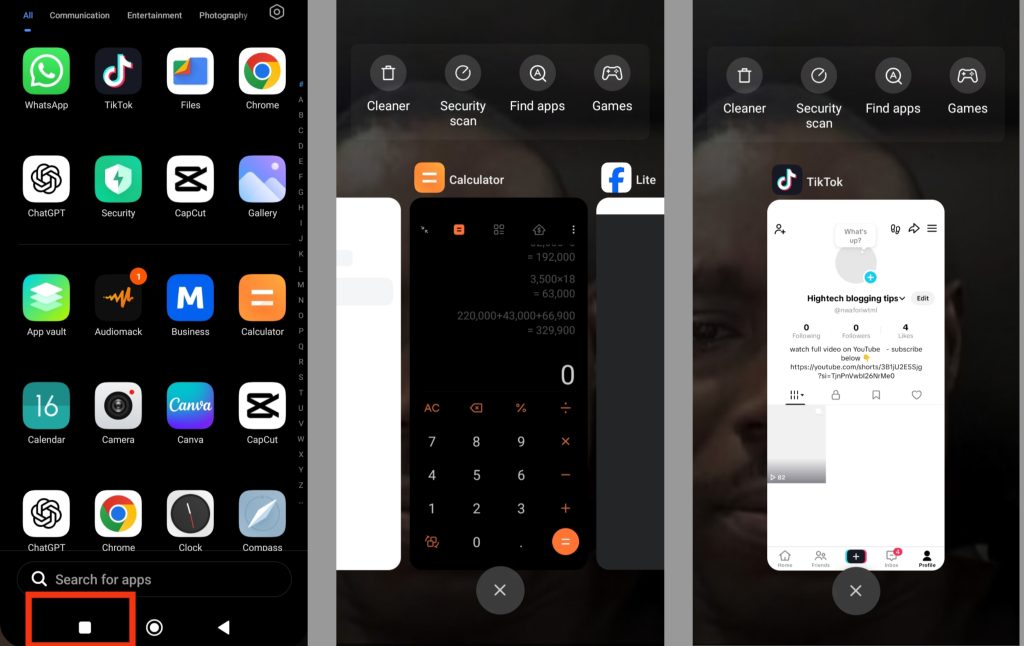
Running multiple apps at the same time forces your phone to share memory and CPU power, which increases battery consumption. Closing unused apps helps TikTok run more smoothly and saves energy.
- Open recent apps screen
- Swipe away apps you are not using
- Keep only TikTok running if possible
Extra Tips to Save Battery on TikTok
Even after adjusting settings, you can still improve battery life with simple habits. Here are extra tips:
1. Avoid spending too much time scrolling continuously without breaks, as long sessions increase battery usage.
2. Turn off live notifications for unnecessary engagement like trending updates or suggestions.
3. Use Wi-Fi instead of mobile data when watching TikTok videos frequently.
4. Close TikTok completely when not in use instead of leaving it in the background.
5. Restart your phone occasionally to refresh system performance and stop hidden background apps.
Conclusion
TikTok battery drain is mainly caused by background activity, video preloading, notifications, and high screen usage, but it can be controlled with the right settings. By managing notifications, enabling data saver, restricting background activity, lowering screen brightness, and keeping the app updated, you can greatly improve your phone’s battery life. The key is to combine these simple adjustments for the best result without affecting your normal TikTok experience.
Frequently Asked Questions (FAQs)
1. Can TikTok still drain battery even if I rarely open the app?
Yes, in some cases TikTok can still affect battery life because it may run limited background processes such as syncing data, checking notifications, or updating content. However, the impact is usually small compared to when the app is actively being used for video watching.
2. Does using TikTok on Wi-Fi reduce battery usage compared to mobile data?
Yes, using Wi-Fi can help reduce battery drain slightly because it is generally more stable and uses less power than mobile data. Mobile data, especially in weak signal areas, forces your phone to work harder, which increases battery consumption while using TikTok.
3. Why does TikTok seem to drain more battery on older phones?
Older or low-performance devices often struggle with TikTok’s heavy video processing, animations, and background tasks. Since the app requires more CPU and memory resources, these devices tend to heat up and lose battery faster compared to newer smartphones.
4. Will reducing notifications affect how I use TikTok normally?
No, reducing notifications does not stop TikTok from working. You will still be able to watch videos, post content, and interact with others. The only change is that your phone will not constantly wake up for every alert, which helps save battery.
5. Is it better to close TikTok completely after each use?
Yes, fully closing TikTok after use can help reduce unnecessary background activity on some devices. While modern phones can manage apps efficiently, closing TikTok occasionally ensures it is not running hidden processes that may slowly consume battery.