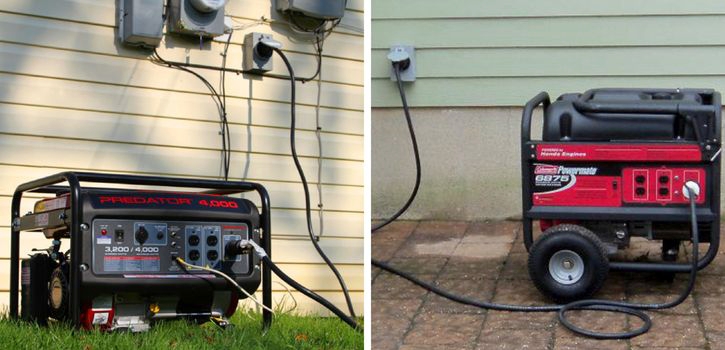
Power outages can happen unexpectedly, and connecting a generator to your house properly can help keep essential appliances running during blackouts. A safe generator setup can power devices like lights, fans, refrigerators, and televisions while protecting your home from electrical damage. In this guide, you will learn how to connect a generator to your house safely, the important equipment needed, and key safety tips to follow for reliable backup power.
Things You Need Before Connecting a Generator
Before connecting a generator to your house, make sure you have the right equipment for safe use.
- Generator (portable or standby)
- Power cable
- Transfer or changeover switch
- Fuel
- Heavy-duty extension cord (if needed)
- Circuit breaker protection
- User manual
Also ensure your generator is strong enough to power the appliances you want to use.
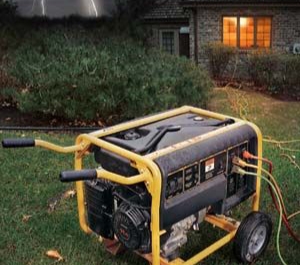
How to Connect Generator to House A Step-by-Step Guide
A backup generator can be a lifesaver during unexpected power outages—but setting it up correctly is essential for both safety and effectiveness. Here’s a fresh, easy-to-follow breakdown of how to connect a generator to your home the right way:
Step 1: Figure Out What You Need to Power
Start by identifying which appliances and electrical systems you’ll need during an outage—think fridges, lights, Wi-Fi, heating or cooling, etc. Add up their total wattage so you know how much power you’ll need. This ensures you choose a generator that can handle the load without risk of overload.
Step 2: Select the Appropriate Generator
Now that you know your power needs, choose a generator that fits the bill. Portable units are ideal for short-term use and specific circuits, while permanent standby generators can power your whole home and start automatically during a blackout. If you’re unsure which suits your situation best, speaking with a licensed technician is highly recommended.
Step 3: Install a Transfer Switch
A transfer switch is a must for safely routing power from the generator to your home’s circuits. It’s installed alongside your electrical switchboard and allows you to toggle between mains electricity and generator power safely. More importantly, it prevents dangerous back-feeding that could harm utility workers or damage your home’s electrical infrastructure.
Step 4: Choose a Safe Spot for the Generator
Generators must be placed outdoors in a dry, well-ventilated area. Keep it far from doors, windows, and vents to avoid carbon monoxide exposure. A professional installer can help you find the safest and most efficient location.
Step 5: Connect to the Transfer Switch
When needed, use outdoor-rated, heavy-duty extension cords to link the generator to the transfer switch. This step is vital for a safe and reliable setup—and using improper cables can lead to overheating or system failure.
Step 6: Properly Ground the Generator
Grounding protects both you and your appliances from electric shock and fire hazards. Follow the instructions provided in your generator’s manual carefully. Depending on your local regulations, you might also need a licensed electrician to perform this task to meet safety standards.
Step 7: Do a Full System Test
Before relying on your generator in a real emergency, do a dry run. Start the generator, activate the transfer switch, and ensure that all essential systems are functioning properly. This also helps you become familiar with the process.
Step 8: Keep Up with Regular Maintenance
To ensure your generator performs reliably when it’s most needed, stick to a maintenance routine. Check oil levels, replace filters, and run it periodically—even when there’s no outage. A combination of DIY checks and professional servicing is best.
How to Maintain a Generator
Keeping your generator in good condition is very important if you want it to work properly during power outages. Regular maintenance helps prevent breakdowns and extends the life of the machine.
Step 1: Regular Inspection
Check your generator often for any signs of damage or leaks. Look at the oil level, fuel level, cables, bolts, and battery condition. This helps you notice small faults before they become serious problems.
How to do it: Walk around the generator and check for oil or fuel leaks under it. Inspect wires and hoses for cracks, clean off dust, and make sure there are no warning signs on the control panel.
Step 2: Change Engine Oil
Engine oil keeps the generator running smoothly and prevents overheating. Dirty oil can reduce performance and damage the engine, so it should be replaced regularly based on usage.
How to do it: Run the generator for a few minutes, switch it off, then drain the old oil carefully. Replace the oil filter if needed and refill with the recommended oil type.
Step 3: Clean Air Filter and Check Spark Plug
A clean air filter and spark plug help the generator run efficiently. Dirty parts can make starting difficult and reduce performance.
How to do it: Remove the air filter and clean or replace it if necessary. Check the spark plug for dirt or wear and clean or replace it to ensure smooth operation.
Step 4: Check Battery and Fuel System
If your generator uses a battery start system, the battery must be in good condition. Also, old fuel or blocked lines can affect performance.
How to do it: Clean battery terminals and check voltage. Replace weak batteries if needed. Drain old fuel if it has stayed too long and use fresh fuel when restarting.
Step 5: Run the Generator Occasionally
Even if you don’t use it often, running your generator helps keep it in good working condition. It also helps you detect faults early.
How to do it: Start the generator once a month and let it run for a short time with a small load. After use, clean it and store it in a dry, safe place.
Benefits of Connecting a Generator to Your House
Below are Benefits of Connecting a Generator to Your House, Some key benefits include:
1. Keeps essential appliances like lights, fans, and refrigerators working during outages
2. Provides comfort and reduces stress during long periods of blackout
3. Helps prevent food spoilage by keeping refrigerators and freezers powered
4. Supports remote work, online learning, and stable internet connection
5. Improves home security by keeping security lights and systems active
6. Makes daily life easier and more convenient during power failures
Common Mistakes to Avoid
Below are Common Mistakes to Avoid, Some common mistakes include:
- Connecting the generator directly to a wall socket
- Using weak or undersized cables
- Running the generator inside the house or closed spaces
- Ignoring regular maintenance and servicing
- Overloading the generator beyond its capacity
- Refueling while the generator is still running or hot
Avoiding these mistakes will help your generator work better, last longer, and keep your home safe during blackouts.
Conclusion
Connecting a generator to your house is a practical way to keep essential appliances running during power outages, but it must be done safely and correctly. Using the right equipment like a transfer switch, choosing the right generator size, and following proper connection steps helps protect your home and devices. Regular maintenance also ensures your generator stays reliable whenever you need it. By avoiding common mistakes and following safety guidelines, you can enjoy steady backup power and peace of mind during blackouts.
Frequently Asked Questions (FAQs)
1. Is it possible to run a generator without installing a transfer switch?
Yes, it is possible, but it is not recommended for a house setup. Without a transfer switch, the connection becomes unsafe and may lead to electrical backfeeding, which can damage appliances and pose risks to utility workers. A transfer switch is the safest method for home use.
2. How long can a generator safely run continuously at home?
Most generators can run for several hours depending on fuel capacity and load, but continuous use should be managed carefully. It is best to give the generator breaks, check oil levels regularly, and avoid running it at full load for too long to prevent overheating or engine damage.
3. What type of appliances should be prioritized when using a generator?
During an outage, it is best to prioritize essential appliances such as refrigerators, lights, fans, Wi-Fi routers, and security systems. High-power devices like electric heaters or air conditioners should only be used if the generator has enough capacity.
4. Can weather conditions affect generator performance when installed outdoors?
Yes, weather conditions like heavy rain, extreme heat, or dust can affect generator performance. That is why it is important to place the generator in a well-ventilated, sheltered outdoor area to protect it while still ensuring proper airflow.
5. How can I know if my generator is overloaded while in use?
Signs of overload include unusual noise, reduced performance, frequent shutdowns, or flickering power output. If you notice these signs, immediately reduce the number of connected appliances to avoid damaging the generator.