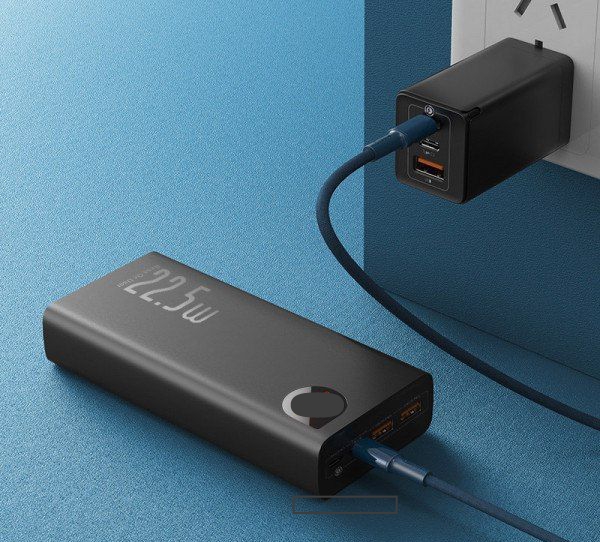
A power bank is one of the most useful accessories for keeping your phone, tablet, earbuds, and other devices charged when you’re away from a power outlet. However, it can be frustrating when the power bank itself refuses to charge or takes an unusually long time to reach a full battery. This problem can happen for several reasons, including a faulty charging cable, a damaged charging port, an incompatible charger, an aging battery, or an internal hardware fault. The good news is that many of these issues can be fixed without replacing the power bank. In this guide, you’ll learn the most common causes of a power bank that won’t charge, practical solutions to fix the problem, warning signs that indicate it may need replacing, and simple maintenance tips to help keep it working properly for years.
Also read: How to Make Your Android Phone Battery Last Longer Without a Power Bank
Why Is My Power Bank Not Charging?
Below are the most common reasons why your power bank may not be charging properly. Identifying the exact cause will help you choose the right solution instead of wasting time trying fixes that don’t address the real problem:
1. Faulty Charging Cable
A damaged or worn-out USB cable is one of the most common reasons a power bank won’t charge. Cables can become loose, bent, or internally broken after repeated use, preventing enough power from reaching the battery. Even if the cable looks fine on the outside, the wires inside may be damaged and interrupt the charging process.
2. Defective Power Adapter
The wall charger or USB adapter you’re using may not be supplying enough power. Low-quality or damaged adapters can cause slow charging or prevent the power bank from charging completely. Using a charger with the correct output helps ensure stable and efficient charging.
3. Dirty or Damaged Charging Port
Dust, lint, and other debris can build up inside the charging port over time, preventing the cable from making proper contact. In some cases, the charging port itself may become loose or damaged after frequent use, making it difficult for the power bank to receive power.
4. Battery Completely Drained
If the power bank has been left unused for a long time or its battery has been completely discharged, it may not respond immediately when connected to a charger. It can take several minutes before the charging indicator lights turn on.
5. Incompatible Charger
Not every charger delivers the same amount of power. Using a charger with a very low power output may cause the power bank to charge extremely slowly or not charge at all. Always use a charger that meets the manufacturer’s recommended specifications.
6. Internal Battery Wear
Like all rechargeable batteries, power bank batteries gradually wear out over time. After hundreds of charging cycles, the battery may lose its ability to accept or hold a charge efficiently. Older power banks are more likely to develop this problem.
7. Internal Circuit Protection
Most modern power banks include built-in safety features that protect against overheating, overcharging, short circuits, and power surges. If the protection circuit is triggered, charging may temporarily stop until the issue is resolved.
8. Extreme Temperatures
Very hot or very cold environments can affect battery performance. Charging a power bank in extreme temperatures may slow the charging process or prevent it from charging until it returns to a normal temperature.
9. Physical Damage
If the power bank has been dropped, exposed to water, or suffered an impact, internal components may be damaged. Even if there are no visible cracks, internal damage can prevent the battery from charging correctly.
How to Fix a Power Bank That Is Not Charging
Most power bank charging problems can be solved with a few simple troubleshooting steps. Try each solution below until your power bank starts charging normally.
1. Check the Charging Cable
Start by inspecting the USB cable you’re using. If the cable is bent, frayed, loose, or damaged, it may not transfer power properly. Try charging the power bank with another high-quality cable that you know works. In many cases, replacing a faulty cable solves the problem immediately.
2. Use a Different Power Adapter
A damaged or low-power wall adapter may not provide enough electricity to charge your power bank. Connect it to a different charger with the recommended output or use the original adapter if you still have it. Avoid very cheap or unbranded chargers that may deliver unstable power.
3. Clean the Charging Port
Dust, lint, and debris inside the charging port can block the connection between the cable and the power bank. Carefully inspect the port and gently remove any dirt using a soft brush, a dry cotton swab, or compressed air. Avoid using metal objects that could damage the charging pins.
4. Charge It for at Least 30–60 Minutes
If the battery has been completely drained, the power bank may not respond immediately after being plugged in. Leave it connected to a wall charger for at least 30 to 60 minutes before assuming it has stopped working. Some deeply discharged batteries need extra time before the charging indicator lights appear.
5. Try a Wall Socket Instead of a Laptop USB Port
Laptop USB ports usually provide less power than wall chargers. If you’re charging through a computer, disconnect the cable and plug the power bank directly into a wall socket using a reliable power adapter. This often provides enough power to restart charging.
6. Check for a Reset Button
Some power banks include a small reset button that restores normal operation after a system error or safety shutdown. If your model has one, press and hold it for a few seconds according to the manufacturer’s instructions, then try charging the power bank again.
7. Allow the Power Bank to Cool Down or Warm Up
If the power bank has become very hot after use or has been left in a very cold environment, charging may stop automatically to protect the battery. Move it to a cool, dry place at normal room temperature and wait a while before trying again.
8. Try a Different Charging Port or Power Source
Sometimes the problem isn’t the power bank at all. Test another wall outlet, extension socket, or USB charging port to make sure the power source is working correctly. A faulty outlet can prevent your power bank from charging.
9. Check the LED Indicator Lights
Most power banks have LED lights that show their charging status. If the lights don’t come on, blink unusually, or stay stuck on one level, it could indicate a charging problem or an internal fault. Refer to your power bank’s user manual to understand what the indicator lights mean.
10. Replace the Battery or Visit a Professional Repair Technician
If your power bank still won’t charge after trying all the troubleshooting steps, the internal battery or charging circuit may be faulty. If your model has a replaceable battery, have it replaced by a qualified repair technician. However, if the battery is built in or the power bank is badly damaged, replacing the entire power bank is usually the safest and most reliable option.
Also read: How to Connect Generator to House
Signs Your Power Bank May Need to Be Replaced
Not every charging problem can be fixed. While many issues are caused by a faulty cable, charger, or charging port, some problems indicate that the power bank itself has reached the end of its lifespan. If you notice any of the following signs, replacing the power bank is usually the safest option.
- The power bank won’t charge after trying different cables, adapters, and power outlets.
- It charges very slowly or loses power much faster than it used to.
- The battery becomes swollen, bulges, or changes shape. Stop using it immediately, as damaged lithium batteries can be dangerous.
- The power bank becomes unusually hot every time you charge or use it.
- The charging port is loose, broken, or no longer holds the cable securely.
- The LED indicator lights no longer work properly or behave abnormally.
- The power bank suddenly turns off even though it still shows remaining battery power.
- It is several years old and no longer holds a useful charge after repeated charging cycles.
If your power bank shows any of these signs, replacing it is often more cost-effective and safer than attempting to repair it.
Tips to Prevent Power Bank Charging Problems
Taking proper care of your power bank can extend its lifespan and reduce the chances of charging problems in the future.
- Use a high-quality charging cable and power adapter.
- Keep the charging port clean and free from dust or lint.
- Avoid dropping the power bank or exposing it to water.
- Do not leave it plugged in for long periods after it reaches a full charge.
- Store it in a cool, dry place away from direct sunlight and excessive heat.
- Recharge the power bank every 2–3 months if you don’t use it regularly.
- Avoid completely draining the battery before charging whenever possible.
- Use the charger recommended by the manufacturer.
- Keep the power bank away from extreme hot or freezing temperatures.
- Buy power banks from trusted brands to ensure better battery quality and built-in safety protection.
Conclusion
If your power bank is not charging, the problem is often caused by a faulty charging cable, damaged adapter, dirty charging port, incompatible charger, worn-out battery, or an internal hardware issue. Fortunately, many of these problems can be solved by checking your charging accessories, cleaning the charging port, using a suitable power source, or allowing the battery enough time to recharge. If your power bank still refuses to charge after trying all the recommended fixes, it may be time to replace it. Regular maintenance and proper charging habits will help keep your power bank working reliably and extend its lifespan.
Frequently Asked Questions (FAQs)
1. Can I use my power bank while it is charging?
Yes, some power banks support pass-through charging, which allows them to charge connected devices while the power bank itself is charging. However, not all models have this feature. Using a power bank this way may also generate extra heat and can reduce battery lifespan over time, so it’s best to check your manufacturer’s instructions before doing so.
2. Why does my power bank take so long to charge?
A power bank may charge slowly if you’re using a low-power charger, a damaged charging cable, or a USB port that doesn’t provide enough power. Large-capacity power banks also naturally take longer to charge than smaller ones. Using the recommended fast charger and a quality cable can help reduce charging time.
3. Is it safe to leave my power bank charging overnight?
Most modern power banks include protection against overcharging, but it’s still not recommended to leave them plugged in overnight regularly. Disconnecting the charger once the battery is fully charged can help extend the battery’s lifespan.
4. How long does a power bank usually last?
A good-quality power bank typically lasts between 300 and 1,000 charging cycles, depending on the battery quality, usage habits, and maintenance. With proper care, many power banks can remain reliable for several years before needing replacement.
5. Can a damaged charging cable stop a power bank from charging?
Yes. Even if a charging cable looks normal on the outside, damaged internal wires can prevent power from reaching the battery. Testing with another high-quality cable is one of the quickest ways to determine whether the cable is causing the problem.
6. Why is my power bank charging but not charging my phone?
This could be caused by a faulty output cable, a damaged USB output port, insufficient battery power, or compatibility issues between the power bank and your device. Try using another cable and test the power bank with a different phone or device to identify the cause.