It can be very annoying when your phone charges slowly even though you are using a fast charger. Many smartphone users expect their battery to fill up quickly, only to notice that the charging percentage increases very slowly or gets stuck for a long time. In some cases, the phone may even continue losing battery while plugged in. This issue is common on Android phones and iPhones, and it is usually caused by charging accessories, software problems, overheating, battery health issues, or incorrect phone settings. In this guide, you will learn the common reasons why your phone is charging slowly even with a fast charger and the practical solutions you can use to fix the problem quickly and improve charging speed. Also read: how to stop your phone battery from draining fast overnight
Also read: How to Make Your Android Phone Battery Last Longer Without a Power Bank
Common Reasons Why Your Phone Is Charging Slowly
There are many reasons why a phone may charge slowly even when connected to a fast charger, and in most cases, the problem is not serious hardware damage. Below are the most common causes explained in detail:
1. Damaged or Low-Quality Charging Cable
One of the biggest causes of slow charging is a faulty charging cable. Many users focus only on the charger head and forget that the USB cable also affects charging speed. If the cable is damaged internally, bent, loose, or made from low-quality materials, it may not transfer enough power to the phone properly. Fake or cheap cables often reduce charging performance and may even cause overheating during charging. In some situations, the cable may charge normally at first but suddenly become slow after a few months of use due to wear and tear.
2. Weak or Incompatible Fast Charger
Not all chargers labeled as “fast chargers” actually support your phone’s required charging technology. Some phones require specific charging standards like USB Power Delivery, Quick Charge, VOOC, SuperVOOC, or Turbo Charging. If the charger wattage is lower than what your device supports, the charging speed will automatically reduce. Using an old charger on a newer phone can also limit charging performance.
3. Dirt or Dust Inside the Charging Port
Dust, lint, or dirt trapped inside the charging port can prevent the cable from connecting properly to the charging pins. Even a small amount of dirt can interrupt power flow and slow down charging speed. Phones carried in pockets or bags often collect dirt inside the charging port over time. This problem may also cause charging interruptions or make the charger feel loose when plugged in.
4. Background Apps Consuming Battery Power
Sometimes your phone may actually be charging correctly, but background apps are consuming battery power at the same time. Heavy apps like games, TikTok, YouTube, Facebook, Instagram, GPS navigation, and video editing apps can use a large amount of power while charging. This makes the charging process appear very slow because the battery is being used while trying to charge.
5. Overheating During Charging
Modern smartphones are designed to reduce charging speed automatically whenever the temperature becomes too high. This is a safety feature that protects the battery from damage. Your phone may overheat if you are gaming while charging, using a thick phone case, charging in a hot environment, or using low-quality accessories. Once the phone overheats, the system slows down charging to control temperature levels.
6. Poor Battery Health or Aging Battery
Phone batteries become weaker over time after repeated charging cycles. If your phone is already several years old, the battery may no longer support fast charging properly. An aging battery may take much longer to fill up, drain quickly, or heat excessively during charging. In some cases, battery health degradation can make fast charging stop working completely.
7. Charging From a Weak Power Source
Charging your phone from a laptop USB port, low-quality extension box, weak wall socket, or unstable electricity source can reduce charging speed significantly. Fast charging works best when connected directly to a strong wall outlet using the correct adapter and cable. Weak power sources often fail to provide enough voltage for proper fast charging performance.
8. Software Bugs or System Glitches
Temporary software issues can also affect charging speed on smartphones. Certain system updates may introduce charging bugs that slow down battery performance. Background system errors, corrupted cache files, or battery optimization problems can interfere with normal charging behavior. Restarting the phone sometimes fixes these temporary glitches immediately. Also read: why your android phone keeps restarting and how to fix it
Also read: why is my phone charging but the battery percentage is not increasing real fix 2026
How to Fix Slow Charging on Your Phone
Below are practical and effective solutions you can try to improve charging speed and restore proper fast charging performance on your phone:
1. Use an Original Charger and Cable
Always use the original charger and cable that came with your phone whenever possible. Original accessories are designed specifically for your device and usually provide the best charging speed. If the original charger is unavailable, buy a certified replacement from a trusted brand that supports your phone’s charging technology. Avoid cheap fake chargers because they may slow charging or damage the battery.
2. Clean the Charging Port Carefully
Inspect your phone’s charging port for dust or dirt buildup. Use a soft brush, wooden toothpick, or dry compressed air to clean the port gently. Avoid using metal objects because they can damage the charging pins inside the port. After cleaning, reconnect the charger and check if charging speed improves.
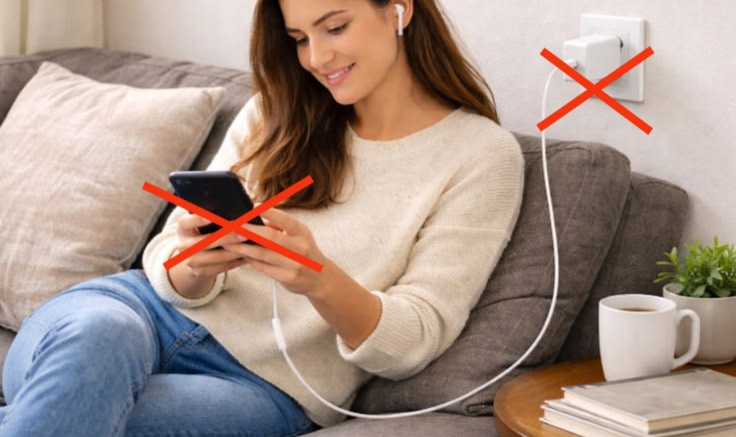
3. Stop Using the Phone While Charging
Using the phone heavily during charging can slow down the charging process. Activities like gaming, video streaming, video calls, hotspot sharing, and social media browsing consume battery power quickly. To allow the battery to charge faster, avoid using the phone unnecessarily while plugged in.
4. Close Background Apps
Apps running in the background may continue consuming battery even when you are not actively using them. Close unnecessary apps before charging the phone. You can also enable battery saver mode to reduce background activity and improve charging performance.
5. Keep the Phone Cool
High temperatures can reduce charging speed automatically. Remove thick phone cases while charging and keep the phone in a cool environment away from direct sunlight. Avoid placing the phone under pillows or blankets during charging because trapped heat can slow charging and damage the battery over time.
6. Restart Your Phone
A simple restart can fix temporary system glitches affecting charging performance. Restarting refreshes the operating system, clears temporary background processes, and may restore proper fast charging functionality immediately.
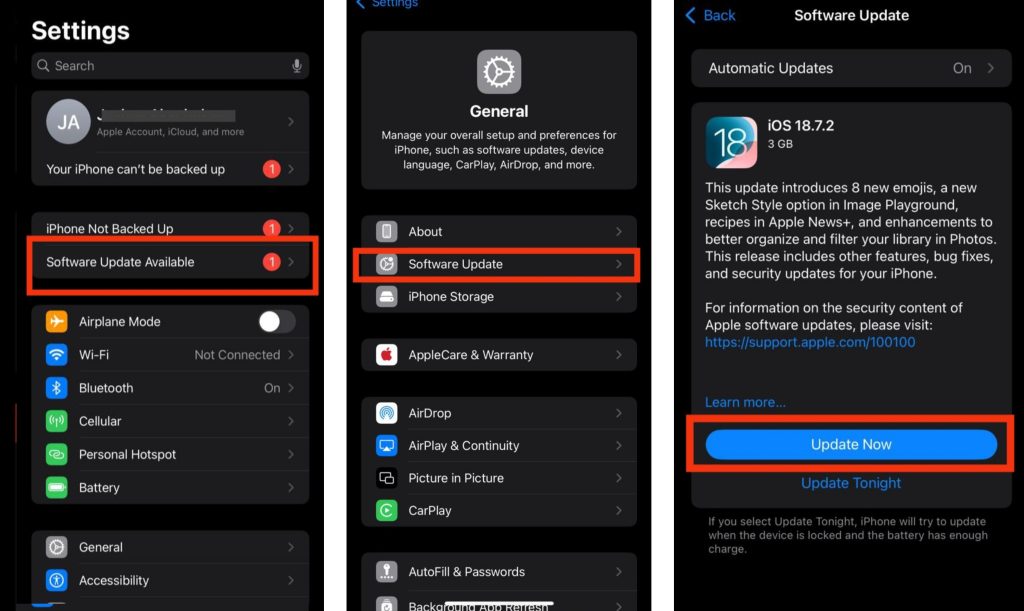
7. Update Your Phone Software
Go to Settings > Software Update or System Update and install any available update. Keeping your phone updated helps fix charging-related bugs, improves battery optimization, and ensures fast charging works properly without software compatibility issues.
8. Enable Fast Charging in Settings
Some Android phones have a fast charging option that can be turned on or off manually in the battery settings. If this feature is disabled, your phone may charge slowly even with a fast charger connected. Check your battery settings and make sure fast charging is enabled properly.
9. Replace a Weak Battery
If your battery health has reduced significantly, replacing the battery may be necessary. An old or damaged battery cannot hold power efficiently and may prevent fast charging from working correctly. Replacing the battery with a genuine one can restore normal charging performance. Also read: how to fix phone overheating problems easily
Also read: why your android phone keeps restarting how to fix it works for tecno infinix samsung
Conclusion
If your phone is charging slowly even with a fast charger, the issue is usually caused by charging cables, overheating, weak power sources, battery health problems, or software glitches. In most cases, you do not need to replace your phone completely to solve the problem. By using original accessories, cleaning the charging port, updating your software, and reducing background battery usage, you can improve charging speed and restore proper fast charging performance. If the issue continues after trying all the solutions above, the battery or charging hardware may require professional repair or replacement.
Frequently Asked Questions (FAQ)
1. Does using Airplane Mode help a phone charge faster?
Yes, enabling Airplane Mode can help your phone charge faster because it temporarily turns off features like mobile network, Bluetooth, and background syncing that consume battery power during charging.
2. Why does my phone charge slowly after a software update?
Sometimes new software updates may introduce temporary bugs or battery optimization issues that affect charging speed. Restarting the phone or installing later updates often helps fix the problem.
3. Can using the wrong charger damage my phone battery?
Yes, incompatible or low-quality chargers can cause overheating, unstable power delivery, and long-term battery damage, especially if they do not support your phone’s required charging technology.
4. Why does my fast charger suddenly stop fast charging?
This can happen due to damaged charging accessories, dirt inside the charging port, overheating, disabled fast charging settings, or battery health problems affecting charging performance.
5. Is it normal for fast charging speed to slow down after 80 percent?
Yes, most smartphones automatically reduce charging speed after reaching around 80 percent to protect battery health and prevent overheating during the final charging stage.