

It can be annoying when your phone shows the charging icon but the battery percentage refuses to increase. This issue is common on Samsung, TECNO, Infinix, Xiaomi, and even iPhones. A Samsung Galaxy A14 user recently had this problem, where the phone stayed stuck at 0% until a simple restart fixed it. This same thing has also happened on my own device, but in my case, restarting didn’t help. I had to change the charging cable before the percentage began to rise again, which shows that this issue has many possible methods and solutions. In this guide, I’ll walk you through the real reasons why your phone charges without increasing in percentage and the proven fixes that work in 2025.
Also read: Why Is My Phone Charging Slowly Even With a Fast Charger?
Why Your Phone Shows the Charging Icon But the Battery Percentage Doesn’t Increase
Before we dive into the solutions, here are the most common reasons your phone may show the charging icon while the battery percentage doesn’t increase:
1. Software Issues
Sometimes your phone shows the charging icon while the battery percentage doesn’t increase due to software-related problems. The system that monitors battery levels can get confused by minor glitches in the operating system or background apps, causing the battery indicator to freeze or display incorrectly. This issue can occur on any smartphone and doesn’t usually mean the battery itself is damaged, but it can make it seem like the phone isn’t charging properly.
2. Faulty Motherboard
The motherboard is the main circuit that manages power and connects all components of a phone. If it develops a fault, the battery may not receive electricity properly, leaving the percentage stuck even when the charging icon shows. These faults can happen from overheating, long-term heavy use, or general wear and tear. Even a small defect can interfere with how the phone measures and displays battery levels, affecting both charging performance and accuracy of the battery indicator.
3. Charging Equipment Problems
The charger and cable you use play a big role in how your phone charges. Damaged, low-quality, or incompatible accessories may prevent the battery from receiving enough power, even if the charging icon shows. Non-original or counterfeit chargers are often the culprit, as they may not deliver a steady flow of electricity. Since the phone depends on these components to transfer power correctly, any problem with the charger or cable can leave the battery percentage stuck despite being plugged in.
4. Bad Battery
A worn-out battery can make your phone show the charging icon while the percentage barely increases. Over time, batteries lose capacity with each charge cycle, reducing their ability to hold power. When this happens, the battery may struggle to take in enough current, leaving the percentage stuck or rising very slowly even when plugged in. In such cases, the issue isn’t the charger or cable—the battery itself can no longer keep up with normal power flow, which can affect how the charge is displayed.
5. Charging Port Problems
A faulty or blocked charging port can make your phone show the charging icon while the battery percentage stays the same. Everyday use can cause dust, lint, or moisture to accumulate in the port, weakening the connection between the charger and the phone. When this happens, power may flow inconsistently, so the charging symbol appears but the battery gains little or no charge. Since the port delivers power directly to the battery, any obstruction or fault can interfere with normal charging and affect how the percentage is displayed.
6. Damaged Cable
A worn-out or damaged charging cable can cause your phone to show the charging icon while the battery percentage doesn’t increase. Frequent bending or twisting can break or loosen the internal wires, reducing the power that reaches the battery. When the cable fails to deliver a stable current, the phone may detect it’s plugged in but still struggle to charge. Even minor faults in the cable or a worn-out wall adapter can interrupt power flow and keep the battery percentage stuck.
How to Fix Your Phone Showing Charging But Battery Percentage Not Increasing
Now that you understand the common reasons behind this issue, the next step is fixing it. Below are practical and effective methods that can help your phone charge normally again, whether you’re using an Android device like Samsung, TECNO, Infinix, or an iPhone in 2025.
1. Update Your Phone Software
Updating your phone’s software can fix charging percentage problems caused by system bugs or errors. Software updates improve how your phone manages battery information and charging status, which can help the battery percentage start increasing normally again.
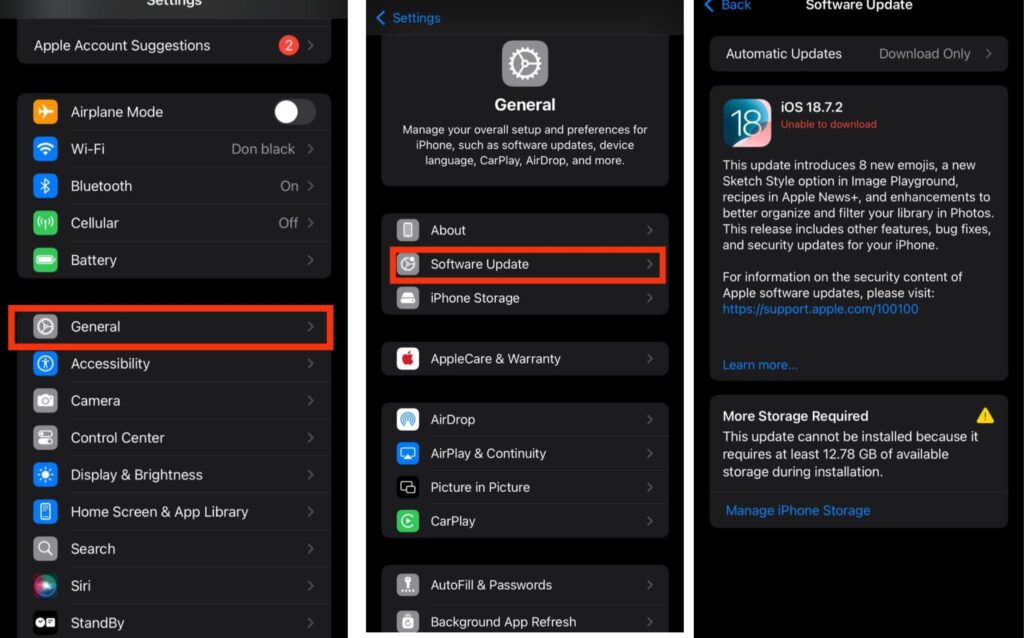
For iPhone:
Step 1: Open Settings and tap General.
Step 2: Select Software Update.
Step 3: If an update is available, tap Download and Install.
For Android :
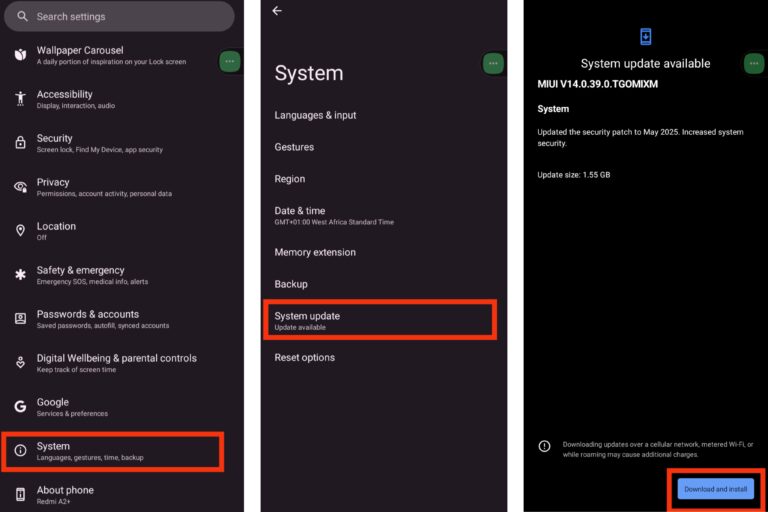
Step 1: Open Settings and go to System or About Phone.
Step 2: Tap Software Update or System Update.
Step 3: Download and install any available update.
2. Check the Power Supply
Before assuming your phone has a serious problem, make sure it is receiving a stable power supply. Even when the charging icon appears, weak or unstable electricity can prevent the battery percentage from increasing. Loose wall sockets, faulty extension boxes, or unreliable outlets may interrupt power flow without being obvious. Ensure the charger is firmly connected to both your phone and a working wall outlet, and if possible, try another socket to confirm steady power. A stable power source allows your phone to receive enough current so the battery percentage can increase normally.
3. Replace Your Battery
If your phone’s battery has worn out, it may no longer hold power properly, which can cause the charging percentage to stay stuck even when the charging icon appears. Once a battery loses a significant amount of its capacity, it struggles to accept enough current, and changing chargers or cables will not solve the problem. Replacing the battery restores proper charging behavior, allows the percentage to increase normally, and helps your phone maintain stable and reliable performance.
4. Clean the Charging Port
A dirty or blocked charging port can prevent your phone from charging properly even when the charging icon appears. Dust, lint, or small debris can build up inside the port over time and weaken the connection between the charger and the phone. Carefully cleaning the port allows the charger to connect firmly and deliver power correctly. When the connection is stable again, your phone can receive enough current, helping the battery percentage increase normally and reducing future charging problems.
5. Replace or Check the Charging Cable
A damaged or worn-out charging cable can cause your phone to show the charging icon while the battery percentage doesn’t increase. Frequent bending, twisting, or general wear can break or loosen the internal wires, preventing a stable flow of electricity to the battery. Even a minor fault in the cable or a worn-out wall adapter can interrupt power delivery, making the phone think it is charging when it isn’t. Replacing the cable and using a high-quality or original adapter ensures proper power flow, allowing the battery percentage to rise normally and helping prevent future charging problems.
6. Drain the Battery and Recharger
If your phone’s battery percentage appears stuck, the indicator may be miscalibrated. Fully draining the battery until the phone shuts down on its own and then recharging it uninterrupted can help recalibrate the system. Make sure to use a reliable charger and a high-quality or original cable to maintain a stable current. This process allows the phone to reset how it measures the battery, helping the percentage display accurately and improving overall battery performance.
7. Visit a Professional Techniciana
If your phone still won’t charge properly after trying all other fixes, it may have a deeper hardware or software issue that only a professional can identify. A trained technician can inspect the device, find hidden faults, and perform repairs safely. Always visit a trusted service center or the official repair provider for your phone model. For brands like Infinix, TECNO, or itel, Carlcare offers authorized service where technicians can restore normal charging performance efficiently.
Also read: How do I stop WhatsApp from draining my battery in the background?
Conclusion
If your phone shows the charging icon but the battery percentage doesn’t increase, it can be frustrating, but the problem usually has a simple explanation. It might be a worn-out battery, a faulty cable, a dirty charging port, or a software glitch. Checking your power source, cleaning or replacing accessories, updating your software, or recalibrating the battery often restores normal charging. If the issue continues, visiting a trusted technician ensures any hidden problems are fixed safely. Taking these steps not only solves the immediate issue but also helps keep your phone’s battery healthy and your device reliable.
Also read: why is my phone not charging
Frequently Asked Questions (FAQ)
1. Why does my phone show it’s charging but the battery percentage doesn’t increase?
This is a common issue on many smartphones, including Samsung, TECNO, Infinix, Xiaomi, and iPhones. It can happen due to a variety of reasons, such as software glitches that prevent the battery indicator from updating correctly, a faulty motherboard that interrupts power flow, a worn-out battery that cannot hold a charge, a dirty or obstructed charging port, or damaged cables and adapters. Understanding the root cause is important before attempting any fix.
2. Can restarting my phone fix the battery percentage issue?
Restarting your phone can sometimes resolve minor software glitches that cause the battery percentage to stay stuck. For example, if background processes or temporary errors are confusing the battery-monitoring system, a restart can help the device recalibrate and display the correct battery level. However, if the problem is related to a worn-out battery, damaged cable, or motherboard issue, restarting alone will not solve the problem.
3. How can I tell if my battery needs replacement?
A worn-out or weak battery is one of the most common reasons for a phone to show charging without the percentage increasing. Signs that your battery may need replacement include slow charging even with an original charger, battery percentage stuck for long periods, sudden drops in battery levels, and the phone overheating during charging. If your phone consistently refuses to gain percentage despite trying multiple chargers, it’s likely the battery can no longer hold power efficiently.
4. Could my charger or cable be causing the problem?
Yes. Faulty or low-quality charging cables and adapters can prevent your phone from receiving enough power, even if the charging icon appears on screen. Over time, bending, twisting, or wear can damage cables and adapters, causing unstable or insufficient current. Using the original charger or a certified high-quality replacement is usually the simplest solution to ensure stable charging and proper battery percentage increase.
5. How do I clean the charging port safely?
A dirty or blocked charging port can interrupt the connection between the charger and your phone, making it seem like the phone is charging when it isn’t. To clean it safely, gently remove any dust, lint, or small debris using a soft brush, toothpick, or compressed air. Avoid using metal objects or applying too much pressure, as this could damage the delicate pins inside. Regular cleaning helps maintain a stable connection and efficient charging.
6. When should I see a professional technician?
If your phone still refuses to charge properly after trying all the basic fixes updating software, cleaning the port, using a high-quality cable, or replacing the battery there may be a deeper issue, such as a faulty motherboard or internal hardware defect. In such cases, it’s best to visit a trusted service center or the official repair provider for your phone model. Experienced technicians can accurately diagnose the problem and perform safe repairs, restoring your phone to normal operation.