
If you’ve noticed your phone’s battery running out faster than usual, TikTok might be the culprit. This popular app often runs in the background, refreshing your feed, sending notifications, and syncing data even when you’re not actively using it. Such background activity can make your device heat up, drain your battery quickly, and even impact your phone’s overall lifespan. The good news is that you don’t need to uninstall TikTok to fix this. With a few simple adjustments in your settings and some smart usage habits, you can stop TikTok from consuming excessive power in the background and keep your battery lasting much longer throughout the day.
Why Does TikTok Consume So Much Battery?
Below are the key technical and usage-related factors that cause TikTok to consume a noticeable amount of battery power on smartphones. These factors explain how the app operates in the background, how it handles video playback and data syncing, and why its design can impact battery life even when you are not actively using the app.
1. Background Activity
One of the biggest reasons TikTok drains so much battery is because it continues running even when you’re not actively using it. The app frequently checks for new notifications, updates your feed, loads fresh content, and syncs data in the background. TikTok may also prepare videos in advance so they play instantly the next time you open the app. All of this background activity uses both power and internet resources, causing your battery to drain faster—even when your screen is off or you believe the app is fully closed.
2. High-Quality Videos and Auto-Playing Content
TikTok is built around high-quality videos that play automatically as soon as you start scrolling. These videos are designed to grab attention, but they also demand a lot from your phone. Each clip loads in real time, refreshes continuously, and uses your device’s processor to play smoothly. This constant activity consumes both data and battery power. The longer you scroll and interact with videos—especially when your screen brightness is high or you’re using mobile data instead of Wi-Fi—the faster your phone’s battery drains.
3. Constant App Refresh and Notifications
TikTok is designed to keep users engaged at all times, which means it frequently refreshes content and sends notifications in the background. Each time there is a new alert, live update, or recommended video, the app briefly wakes your phone to sync data and stay updated. While this process helps TikTok feel fast and responsive, the repeated background refreshing and notification activity steadily consumes power. Over time, this constant communication between the app and your device contributes to noticeable battery drain.
4. Heavy Data Usage
TikTok uses a large amount of data to deliver a smooth and uninterrupted video experience. As you scroll, new videos load automatically, and the app often preloads upcoming content in the background so videos play instantly. This constant data activity keeps your phone’s network connection active and places continuous demand on the processor. Over time, this background data usage increases power consumption, making TikTok one of the apps that can quietly drain your battery even when you’re not actively watching videos.
5. Location Services and Tracking Features
TikTok can also consume battery through its use of location-related features. The app may access your device’s location to personalize content, suggest nearby trends, enable location-based filters, or improve recommendations. Even when you’re not actively using these features, TikTok may still check location data in the background to keep its content relevant. This repeated GPS activity requires extra power and can noticeably increase battery drain, especially when location access is set to run continuously.
6. Animations and Visual Effects
TikTok relies heavily on animations, filters, and visual effects to make videos more engaging. Even when you’re not actively watching, the app may still process these visual elements in the background to keep content loading smoothly and ready to play. Rendering animations and effects requires extra processing power from your phone’s graphics system, which increases energy use. When this happens repeatedly in the background, it contributes to gradual battery drain, making TikTok one of the apps that can reduce battery life faster than expected over time.
How to Save Battery When Using TikTok
Below are practical and effective ways to reduce TikTok’s battery consumption. Each step is designed to help your phone run longer and more efficiently while still allowing you to enjoy the full TikTok experience. By following these methods, you can immediately notice improvements in battery life and device performance.
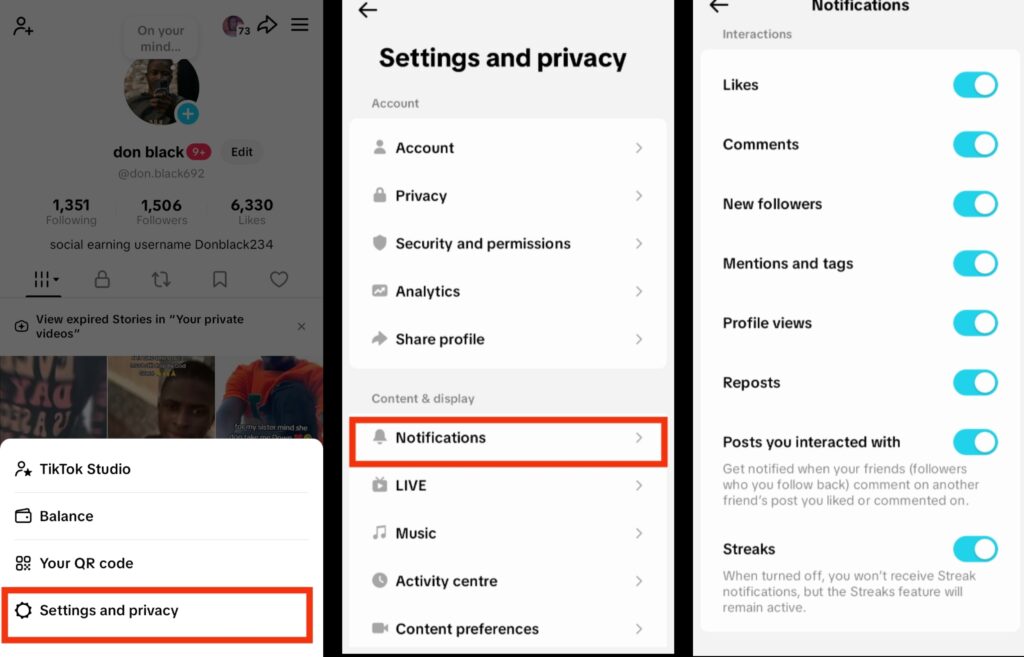
1. Manage Notifications on TikTok
Notifications are one of the main reasons TikTok can drain your phone’s battery in the background. Every alert—such as new followers, comments, live notifications, or video suggestions—can wake the app, turn on your screen, and use power even when you’re not actively using TikTok. If these alerts come in frequently throughout the day, they can have a noticeable impact on your battery life. Managing which notifications TikTok is allowed to send helps reduce background activity while still keeping you informed about what matters most.
Step:
- Open the TikTok app on your phone.
- Go to your Profile and tap the menu (☰) icon.
- Select Settings and Privacy, then tap Notifications.
- Choose the notification types you want to turn off, such as live alerts, video suggestions, or activity updates.
2. Turn On Data Saver in TikTok
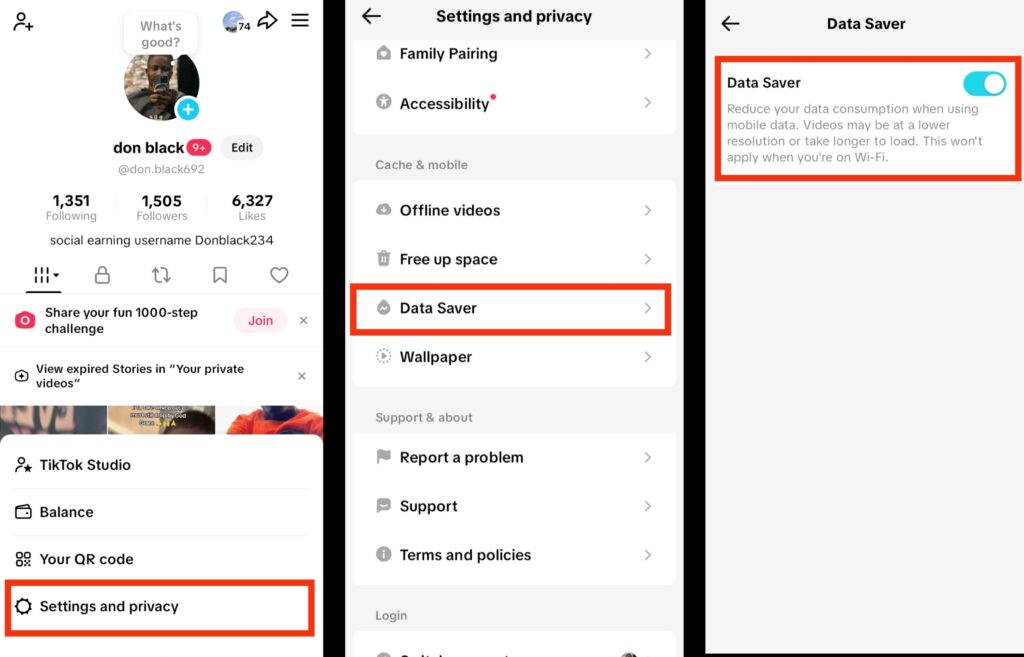
A major reason TikTok can drain your battery is that it automatically loads high-quality videos and preloads content in the background. While this makes scrolling smooth, it also consumes significant power and data. Turning on Data Saver reduces video quality slightly and limits background preloading, helping your battery last longer without affecting your overall experience.
Step:
- Open the TikTok app on your phone.
- Go to your Profile and tap the three-line menu (☰) in the top corner.
- Select Settings and Privacy → Data Saver.
- Toggle Data Saver to On to reduce video quality and minimize background activity.
- Optionally, limit auto-play for videos to save even more battery while using the app.
3. Turn Off Background Refresh on TikTok
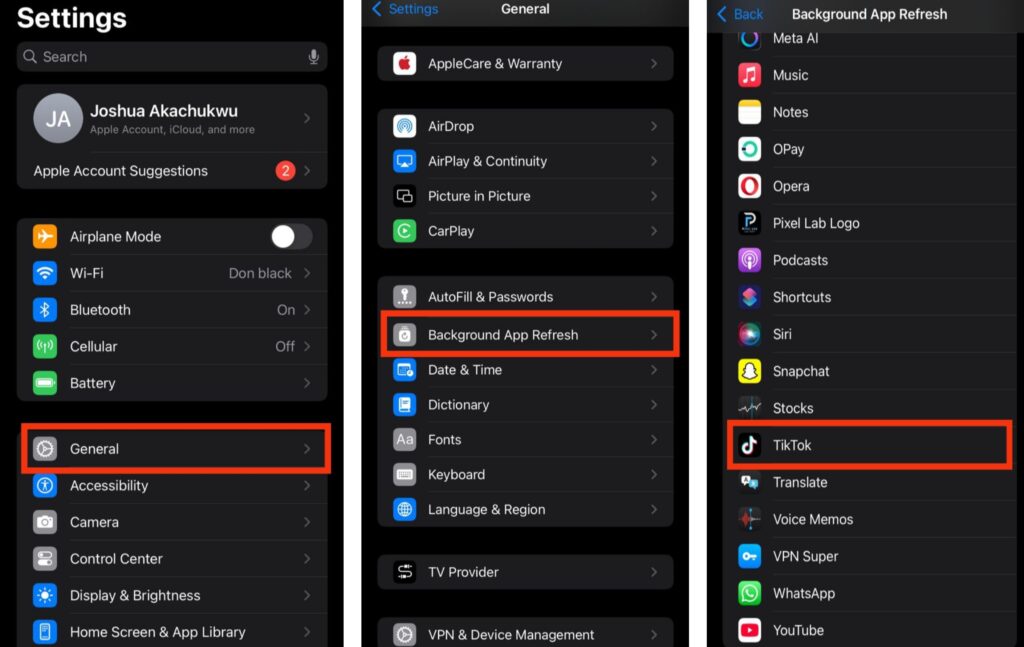
TikTok often runs in the background to refresh your feed, preload videos, and sync notifications. While this helps content load quickly when you open the app, it can also quietly drain your battery and put extra load on your device. Disabling background refresh ensures TikTok only uses power when you actively open the app, helping your battery last longer.
Step:
- Open the Settings on your phone.
- Look for General in the list.
- Tap on Background Activity or Background App Refresh.
- Toggle it Off to prevent TikTok from running in the background.
This simple adjustment can make a noticeable difference in battery life while still allowing you to enjoy TikTok when you’re using it.
4. Reduce Animations and Effects in TikTok
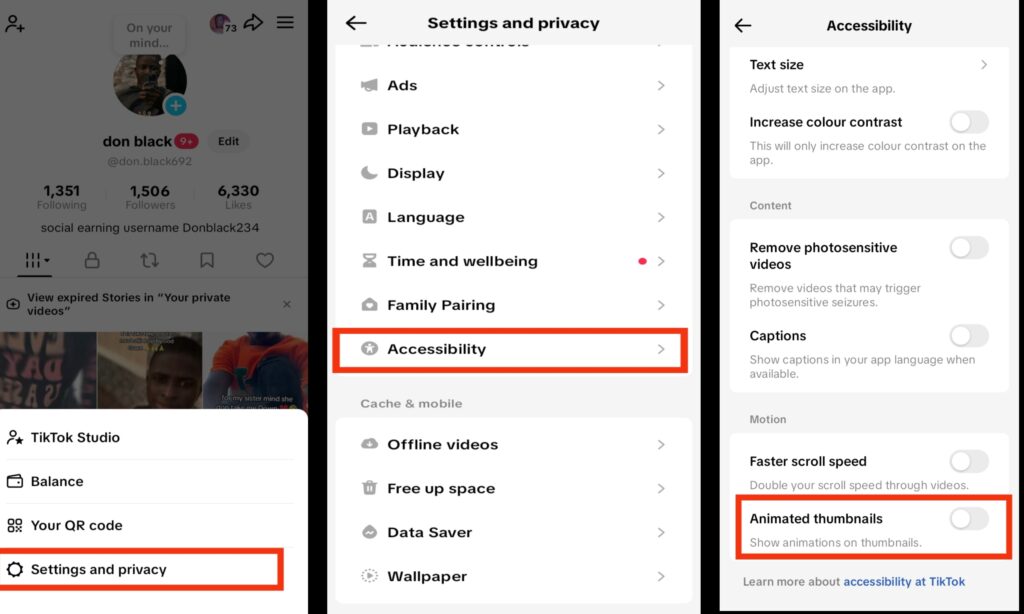
TikTok uses visual animations and motion effects to make content feel smooth and engaging, but these features can also keep your phone working in the background. Elements like animated thumbnails require extra processing power, even before you start watching a video. Reducing these effects helps lower background activity, which can improve battery performance without changing how you normally use the app.
Step:
- Open the TikTok app on your phone.
- Tap Profile at the bottom of the screen.
- Tap the three-line menu (☰) in the top-right corner.
- Select Settings and privacy, then scroll down and tap Accessibility.
- Turn off Animated thumbnails to reduce background visual processing.
- Keep other motion-related options disabled unless you specifically need them.
5. Keep TikTok Updated
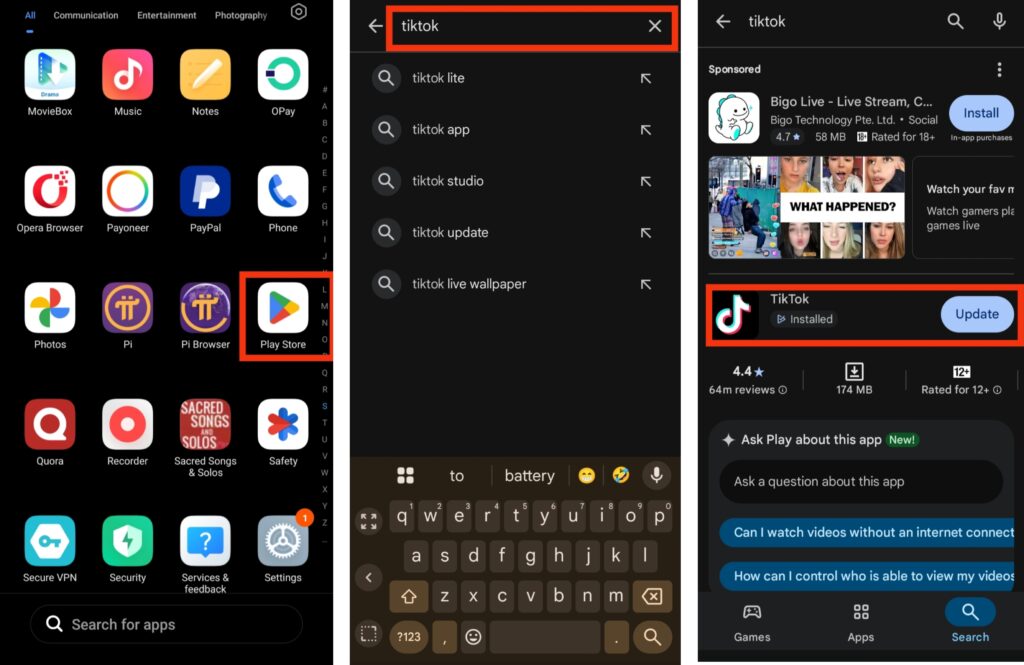
App updates often include performance improvements that help reduce unnecessary background activity. When TikTok is outdated, it may run inefficient processes or contain bugs that cause extra battery drain. Keeping the app updated ensures you’re using the most optimized version, which can help improve battery efficiency and overall stability.
Step:
- Open the Google Play Store or Apple App Store on your phone.
- Search for TikTok using the search bar.
- Tap Update if a new version is available.
- Allow the update to complete before reopening the app.
- Enable automatic updates to ensure TikTok stays up to date in the future.
Conclusion
TikTok is a fun and engaging app, but its background activity can quietly drain your battery and affect your phone’s performance if left unchecked. The good news is that you don’t need to stop using TikTok to protect your battery. Simple steps like turning on Data Saver, reducing animations and effects, managing notifications, limiting background activity, and keeping the app updated can make a noticeable difference. These small adjustments help your phone stay cooler, last longer between charges, and run more smoothly throughout the day. By taking control of how TikTok operates in the background, you can continue enjoying content without constantly worrying about your battery running out.
Frequently Asked Questions (FAQ)
1. Can TikTok Drain My Battery Even When I’m Not Using the App?
Yes, TikTok can quietly drain your battery even when the app isn’t open. This happens because the app sometimes runs in the background to fetch notifications, refresh your feed, or preload upcoming videos so they load instantly when you open the app. While this makes TikTok feel fast and responsive, it also keeps your phone’s processor and memory working without your knowledge, gradually consuming battery power. Limiting background activity and controlling which notifications you receive can help prevent this invisible drain and make your phone last longer throughout the day.
2. Does Watching TikTok Videos in HD Affect Battery Life?
Absolutely. High-definition videos look sharper and smoother, but they require more energy from your phone’s processor and graphics system. This extra processing power combined with features like autoplay and preloading videos can significantly shorten battery life, especially if you watch TikTok for long periods. By switching to lower video quality or enabling Data Saver mode, you can still enjoy content without putting too much strain on your battery, making it last longer between charges.
3. Can TikTok Use More Battery on Older Phones?
Yes, older smartphones are more likely to experience rapid battery drain when using TikTok. Older devices often have less efficient processors, smaller batteries, and weaker graphics capabilities, which makes running high-performance apps more taxing. Features like autoplay videos, animations, and background data syncing require more energy than older hardware can handle efficiently. Using background restrictions, enabling Data Saver mode, and reducing visual effects can help older phones manage battery consumption better while still enjoying TikTok.
4. Will Turning Off Auto-Play Save Battery on TikTok?
Yes, disabling auto-play is one of the simplest ways to reduce battery drain. When auto-play is on, videos continuously load and play automatically as you scroll, keeping your screen and processor active the entire time. Turning off auto-play allows you to manually start videos, giving your phone a chance to rest between content and lowering overall battery usage. This small change can make a noticeable difference, especially if you spend hours on TikTok each day.
5. Do TikTok Filters and Effects Drain Battery Faster?
Yes, filters, augmented reality effects, and animations can use extra processing power, which increases battery consumption. Even when viewing videos that use these effects in the background, your phone may still work harder to render visuals smoothly. Reducing the use of heavy filters, disabling animated thumbnails, and lowering video resolution can help conserve battery without affecting your overall TikTok experience. For those who spend a lot of time creating or watching effects-heavy content, these adjustments can noticeably improve daily battery life.
6. Is It Better to Watch TikTok on Wi-Fi or Mobile Data for Battery Life?
Watching TikTok on Wi-Fi generally uses less battery than mobile data. Mobile networks, especially if the signal is weak, require extra energy for your phone to maintain a stable connection. Wi-Fi is more efficient and can reduce the load on your phone’s processor. Pairing Wi-Fi usage with Data Saver mode, Dark Mode, and background restrictions provides the most battery-friendly TikTok experience while still allowing you to enjoy videos for longer periods.